Overview
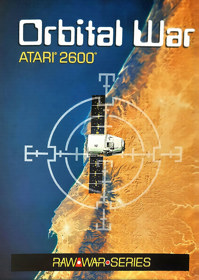
Year 2073 A.D. We are in war! Peace on planet Earth has never been human's strong point. For thousands of years men have fought baseless battles to prove their superiority over their fellow men. Diplomatic agreements were proposed by the nations involved in the conflict without any effective result. As an emergency measure, the battle has been moved off-planet into Earth orbit, but the enemy army insists on bombing Earth's soil. Armed with ballistic missiles and heavy artillery, now it's up to you to try to restore order and peace on the planet again, even if you need to aggressively fight your opponent to do so. Prepare the attack! Fire!
[1] The Color/B-W switch makes the game more difficult in the B-W position.
[2] Use the Reset switch to restart the game.
[3] The Select switch and Difficulty switchs are not used in this game.
You can command heavy artillery sights and ballistic missile launch bases in the following ways:
Joystick 1 (for the first player):
Use the Left Joystick to move the aim (keep the direction pressed to go up or down in the orbits) and fire the heavy artillery shots with the button.
Joystick 2 (for the second player):
Use the Right Joystick to place the ballistic missiles on the Earth's surface (keep the rod pressed to obtain the position) and fire them with the button.
Attention: If you choose to play alone, you can also use Joystick 1 (left) to position the missiles (joystick down with the aim positioned on one of the 4 points marked on the radar, in the lowest orbit) and fire them (joystick to up and button with the aim positioned in any area of ??the highest orbit).
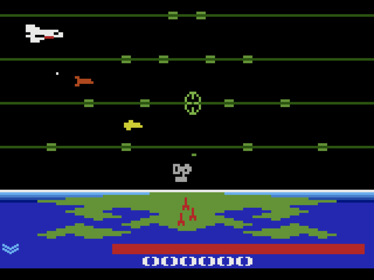
Your objective is to destroy 10 shuttles in each battle scenario, to advance to the next wave, and score as many points as possible in the game by going as far as possible in the mission, defeating the enemy. (The rightmost digit on the Score indicates the number of shuttles hit in each wave.)
For that, you have unlimited missiles that can be fired from 5 positions on the planet, with 3 different speeds according to the location of the launch bases on the Earth's continents.
2 bases on the left [ Americas ] Average Speed
1 base in the center [ Europe ] Slow Speed
2 bases on the right [ Asia and Oceania ] Fast Speed
Each type of weaponry you use is intended for an enemy target type. Heavy artillery destroys spacecraft 1 and spacecraft 2. Ballistic missiles destroy the shuttle. Both block enemy bombs during battle.
Playing with Joystick 1 only: Use the aim to fire the missiles (Joystick 1 up and button, in any area of ??the highest orbit) and to position the missiles on the Earth's surface (Joystick 1 down, in one of the 4 points marked on the radar, in the highest orbit low).
Enemy attack is launched by the shuttle that flies above the highest orbit on the radar and protection from enemies is done through satellites that navigate in the lowest orbit. Every time a bomb lands on dry land, the planet's energy bar decreases.
Status Bar: Shows the attack launched against you. If the planet is close to being destroyed, the bar flashes warning of the critical situation.
When you level up, you receive 10,000 points, 5 energy charges in the planet's status bar, and 1 more military badge, signaling that you are advancing in the mission.
Missiles are destroyed if they hit absorption shields. The satellite body does not hamper the advance of the missiles. Shields also absorb heavy artillery.
Every time you somehow hit the satellite's shield the energy bar decreases.
When missiles cross the highest orbit, the aim automatically shift to the previous orbit, if positioned there.
By keeping the aim in line with the shots fired, you have an artillery range limiter. For shots to move freely through the eye sockets, move the aim after firing.
Missiles when hit on solid ground protect the planet. Your weaponry will be destroyed, however you will be rewarded with Score points.
In the Score you can check how many Shuttles were hit per wave (Rightmost digit)
Aim / Heavy Artillery [ Destroy Spacecrafts 1 and 2 ]
Ballistic Missiles [ Destroy Shuttle ]
Enemies
Spaceship 1 [ 100 Points ]
Spaceship 2 [ 200 Points ]
Shuttle [ 500 Points ]
Level Up [ 10,000 Points ]
Obstacles
Enemy Bomb shoot down with Heavy Artillery [ 30 Points ]
Enemy Bomb shoot down with Ballistic Missiles [ 50 Points ]
Enemy Satellites cannot be destroyed [ You lose energy when they get hit ]
The game has 6 waves. In waves 1, 3 and 5 the battles take place during the day. Waves 2 and 4 represent the night part of the Earth. In wave 6, the height of the war takes place during a blackout on the planet.
In night battles, blackout and Attack at Sea mode (see below) the planet and the radar do not flash, signaling the collision of enemy bombardment on the surface. In these situations, keep your attention on the energy bar.
During the blackout, you will make a blind attack. In this battle you don't see where your heavy artillery shots are moving and you will only have the aim as a reference for the direction of the shots. This is the most critical situation during the confrontation with the enemy.
Bombs that fall into the sea do not damage the planet, except in Attack at Sea mode (see below). However, be aware, they can cross the radar and reach solid ground in another point of the globe.
The satellites stop their flight in orbit, for a few seconds, from the 5th shuttle hit in the same wave, causing complicated situations for the missile launch bases. In the 5th wave the shuttle also performs this maneuver.
Military badges indicate which wave of the game you are in, for a total of 6 waves (per war).
Color/B-W Switch [ Attack at Sea ]
Use the console's Color/B-W Switch to select Attack at Sea mode (B-W position).
In this scenario you fire 2 pairs of missiles at a time, but the shuttle also launches a constant double attack, making it difficult for the missiles to cross to their objective. Enemy attack now also departs from space.
In this mode, it is not possible to detect when the bombs hit the ocean, nor when you hit enemy defense satellites. There is also no distinction between night and blackout waves.
Whenever you want to trigger Attack at Sea mode, or go back to normal battle mode, you need to restart the game (Reset Switch), as the command does not work during the course of the match.
This advanced mode is only suitable for players who are already very well trained.
Game Over
The game ends when you lose all energy from the planet's status bar.
Victory
You win the war if you can resist the attack during the blackout in wave 6.
Is there only one war to be fought? Find out as soon as possible!
Ways to use Joysticks in Orbital War:
Orbital War can be played by two players simultaneously, in co-op, or by just one player in solo mode.
For 2 Players (cooperative mode):
[1] Easy Game - One player controlling the aim (Joystick 1) and the other player controlling the missiles (Joystick 2).
Suggestion: Switch controls between players during the game with each new wave.
For 1 Player (solo mode):
[2] Normal Game - One player controlling missiles only (Joystick 2).
[3] Hard Game - One player controlling the aim and missiles (with Joystick 1).
[4] Advanced Game - One player controlling the aim (with Joystick 1) and missiles (with Joystick 2). Use a bracket to attach the two joysticks.
Get creative: Discover other ways to play Orbital War.
How to play Orbital War with the Game Board:
Orbital War can also be played with the game board that came with the cartridge.
Choose one of the modes above and track your progress in the mission.
[1] Place the pawn at the base of the game board, on top of the red circle, referring to the 1st war to be fought (War I).
[2] Start the game on the console (Reset Switch) and with each wave conquered, advance the pawn to the next circle, towards the top of the map.
[3] After winning the highest wave of the 1st war, open the envelope with the secret message (Top Secret) and learn how to direct your troops to the next conflict (the game will continue).
[4] You win the game if you manage to restore peace to the world after the 5th war.
If you want to continue playing, to reach new records, follow the same procedure to access the next battles.
Good strategy!
GAME BOARD
In the missile command room, you are in charge of the Earth defense operation.
With this orientation map, you will be able to see your progress in the war and how much is left to save humanity.
Place the pawn at the base of the game board, on top of the red circle, referring to the 1st war [WAR I].
Start the game on the console and, with each Wave and military badge conquered, advance the pawn to the next circle, towards the top of the map.
After winning the highest stage of the red sequence [Wave 6], open the envelope with the secret message [TOP SECRET] and find out how to continue the game, directing your troops to the next conflict.
Now that you know how to access the following battles, place the pawn on the first circle referring to the war [WAR] you are in and press the RESET Switch on the console.
You win the game if you manage, in just 5 attempts [numbered cards], to restore peace in the world after the 5th war.
Good luck in mission command!
- Developers
- Leandro Camara
- Publishers
- Sky Line Games
- Platform
- Atari 2600
- Genre
- Shooter
- Alternate Names
- No information available
- Wikipedia
- No information available